# Bookmark

### Requirement (v1.0)

* **データ同期**:
  * オフライン状態で作成されたブックマーク/続きを見る情報は、次回オンライン状態で送信して同期が必要です。
* **続き再生情報の送信**:
  * 続きを見る情報は、アプリ終了時に送信します。
  * PC再生中に終了する場合、JavaScriptで終了確認メッセージを表示し、終了時に一度だけ続き再生情報を送信すればよいです。
  * Flashの場合、一定の間隔で情報を送信します。
* **SDK機能のリクエスト**:
  * SDKで累積されたブックマークおよび続きを見る情報リストを取得し、これをクリアする機能が必要です。
  * この機能はSDKアップグレードのスケジュールに反映して提供される予定です。
* **処理コールバック**:
  * SDKのブックマークおよびn-screen情報送信に関する処理コールバックを提供します。
  * この機能もSDKアップグレードのスケジュールに反映して提供される予定です。
* **時間情報の追加**:
  * ブックマークと続き再生各項目に時間情報を追加します。
  * 時間情報はユーザー端末のローカル時間であり、時間同期の問題が発生する可能性があるため、データ使用時には注意が必要です。

### 1. Kollus設定 <a href="#bookmark-kollusno" id="bookmark-kollusno"></a>

ブックマーク・続き再生(N-screen)連係はサービスアカウント全体に一つのURLのみ指定できます。他のCallbackのようなチャンネル別設定ができません。

* Kollusシステム側での設定が必要なため、使用する際には担当者にお問い合わせください。

### 2. Bookmark API <a href="#bookmark-bookmarkapi" id="bookmark-bookmarkapi"></a>

ブックマークデータを使用するKollus Playerと顧客DBのブックマーク情報を連係する際に使用します。

#### API Params <a href="#bookmark-apiparams" id="bookmark-apiparams"></a>

<table><thead><tr><th width="211">Name</th><th width="130.33333333333331">Type</th><th>Note</th></tr></thead><tbody><tr><td>upload_file_key</td><td>string</td><td>コンテンツのアップロードファイルキー (Unique)</td></tr><tr><td>media_content_key</td><td>string</td><td><br></td></tr><tr><td>client_user_id</td><td>string</td><td>ユーザID(顧客のサービス会員)</td></tr><tr><td>position</td><td>integer</td><td>ブックマーク位置</td></tr><tr><td>localtime</td><td>integer</td><td>ブックマーク生成時刻 (参照: ユーザ system time,</td></tr><tr><td>value</td><td>string</td><td>ブックマークタイトル ('&#x26;' 文字除外)</td></tr><tr><td>label</td><td>string</td><td>ブックマークリストタイトル</td></tr><tr><td>uservalue(0~9)</td><td>string</td><td>User Value</td></tr></tbody></table>

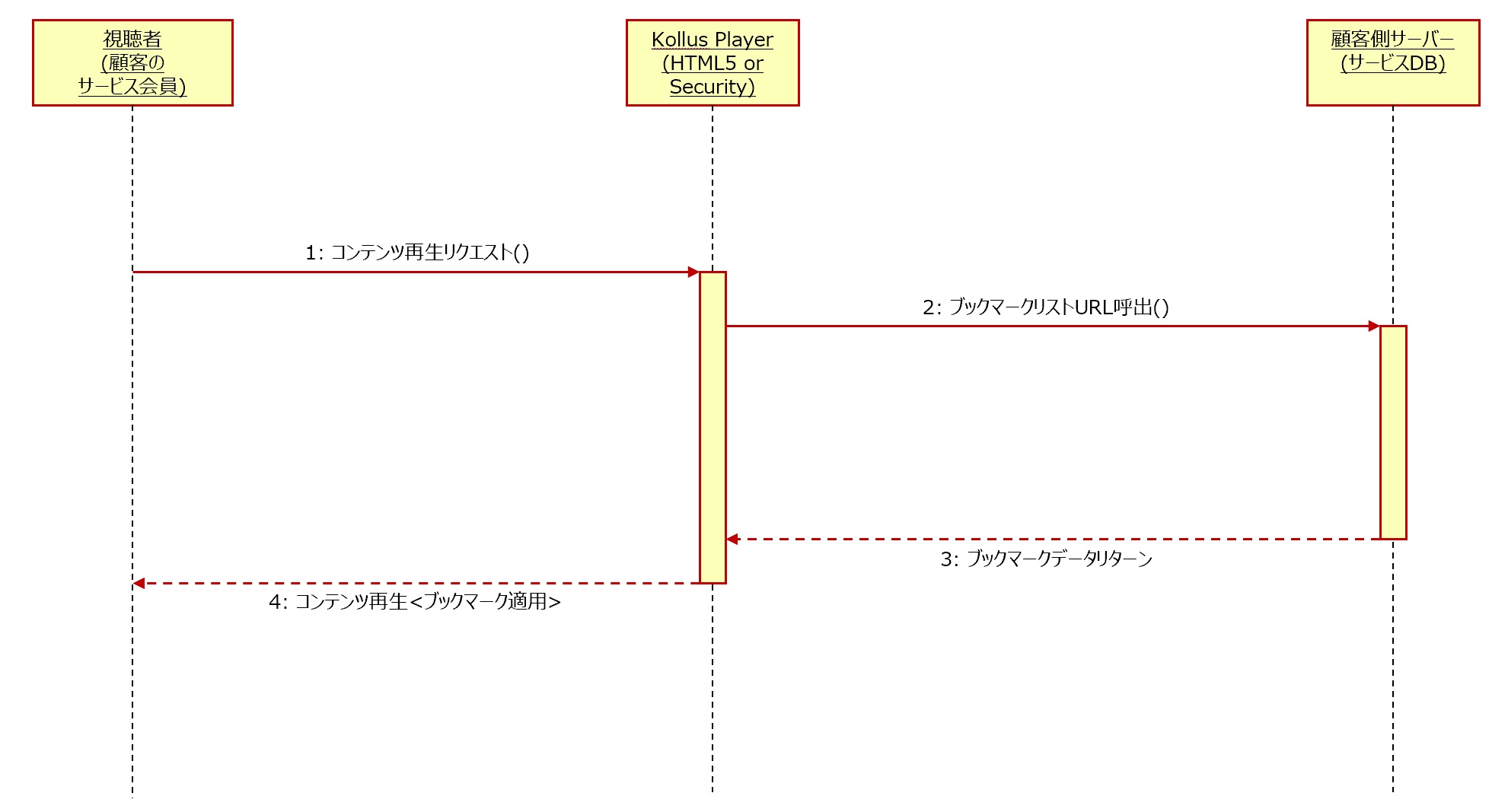
### 3. ブックマークリスト獲得 Api (List Url) <a href="#bookmark-bukkumkurisutoapilisturl" id="bookmark-bukkumkurisutoapilisturl"></a>

ブックマークリストを獲得するために呼出すURLとなります。ブックマークデータはJSON形態のUTF-8でリターンしてください。

<figure><img src="/files/SSVDsNrEqjYtjdgen7jm" alt=""><figcaption></figcaption></figure>

**Request**

* インデックスブックマーク
  * method : GET
  * params:
    * (string) upload\_file\_key
    * (string) media\_content\_key : 存在しない場合もあり
* インデックス+ユーザーブックマーク
  * method : GET
  * params :
    * (string) media\_content\_key
    * (string) client\_user\_id
* ブックマークURLの因子に{USERVALUE0\~9}項目がある場合にはuservalue0(\~9)で置換してリクエストします。
  * 例示) ブックマークURLが<http://abc.com/bookmark/read?LC={USERVALUE0}\\&device={USERVALUE9}で登録されていて、uservalue0がLC001でuservalue9がmobileだとhttp://abc.com/bookmark/read?LC=LC001\\&device=mobile> の形でリクエストする。

**Response**

* error : 正常の場合0 (必ず0でなければなりません。)
* bookmark\_labels : リスト項目に表示するリストタイトル
  * kind 0 : Bookmark
  * kind 1 : Index
* result : 全ての結果はresult項目の下位に表示させます。
  * bookmark\_positions : ブックマークデータリスト
    * poistion : ブックマーク位置
    * value : ブックマークタイトル
    * kind
      * 0 : ユーザブックマーク
      * 1 : インデックスブックマーク
    * label : インデックスブックマークタイトル (ユーザブックマークはこの値を無視)
    * localtime : ブックマーク生成リクエスト時刻 (ユーザ localtime - 参考データに使用 unixtimestamp 形式)

**Sample data**

```
{
    "error" : 0,
    "result" : {
   		“bookmark_labels” : [
            "Bookmark",
            “Index”
        ],
        "bookmark_positions" : [
            {
                "position" : 3,
                "value" : "",
                "kind" : 0,
                "label" : "",
                "localtime" : 1417568260 },
            {
                "position" : 5,
                "value" : "開始",
                "kind" : 0,
                "label" : "",
                "localtime": 1417568265 },
            {
                "position": 7,
                "value" : "",
                "kind" : 1,
                "label" : "管理者Aブックマーク",
                "localtime" : 1417538260 },
            {
                "position" : 12,
                "value" : "",
                "localtime" : 1417568270 },
            {
                "position" : 13,
                "value" : "",
                "kind" : 1,
                "label" : "管理者Bブックマーク",
                "localtime" : 1417538260 }
      	  ]
    }
}
```

#### ブックマークデータ一括編集 Api (Update Url)

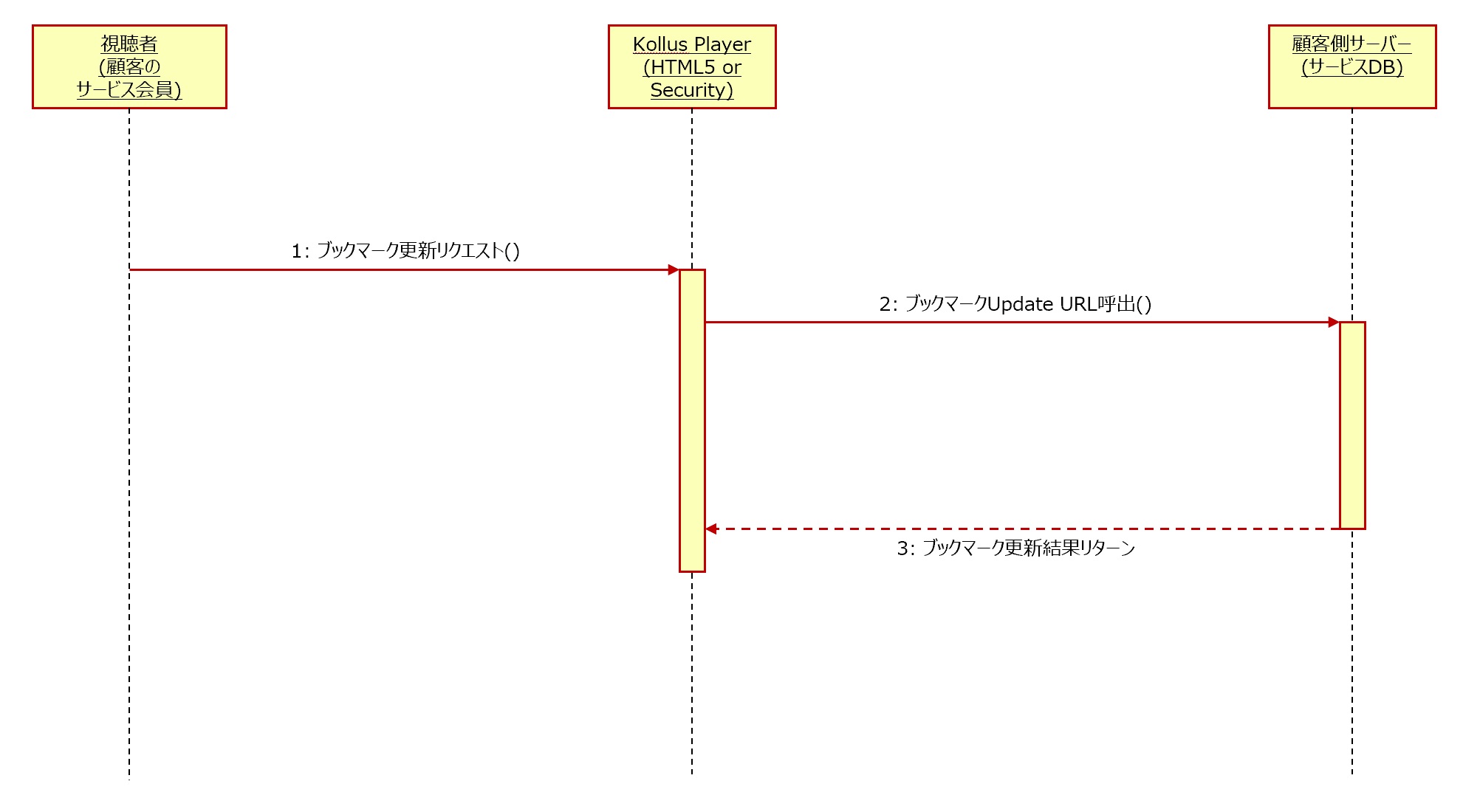
複数のブックマークを一括で処理するためのURLとなります。actionはregister, removeとなり、それぞれがregister, removeの機能を順番通りに処理します。順番通りに処理します。

Update URLが呼出される場合、Register/Remove URLは呼出されません。

<figure><img src="/files/9UO6gTN3Mb4KYvQl2BKi" alt=""><figcaption></figcaption></figure>

**Request**

* method : POST
* params:
  * (string) bookmarks : {action block}がarrayで構成されたJSONフォーマットの文字列
* {action block}
  * action : ‘register’ or ‘remove’
  * インデックスブックマーク<br>
    * (string) upload\_file\_key
    * (integer) position
    * (string) label
    * (string) value : removeには含まれない
    * (integer) localtime
  * ユーザブックマーク<br>
    * (string) media\_content\_key
    * (string) client\_user\_id
    * (integer) position
    * (string) value : removeには含まれない
    * (integer) localtime
  * user\_value
    * ブックマークURLの因子に{USERVALUE0\~9}項目がある場合にはuservalue0(\~9)で置換してリクエストします。
* bookmarksの例示)
  * <http://abc.com/bookmark/update?LC=>{USERVALUE0}\&device={USERVALUE9}で登録されていて、user\_value0が LC001でuser\_value9がmobileの場合

```
[
    {
        "action" : "register"
        , "media_content_key" : "x53gaH3a"
        , "client_user_id" : "test_user_id"
        , "position" : 45
        , "localtime" : 1414538260
        , "LC" : “LC001”
        , "device" : “mobile”
     },
     {
        "action" : "remove"
        , "media_content_key" : "x53gaH3a"
        , "client_user_id" : "test_user_id"
        , "position" : 67
        , "localtime" : 1417538260
        , "LC" : “LC001”
        , "device" : “mobile”
    }
]
```


---

# Agent Instructions: Querying This Documentation

If you need additional information that is not directly available in this page, you can query the documentation dynamically by asking a question.

Perform an HTTP GET request on the current page URL with the `ask` query parameter:

```
GET https://catenoid-support.gitbook.io/kollus-dev-jp/bookmark.md?ask=<question>
```

The question should be specific, self-contained, and written in natural language.
The response will contain a direct answer to the question and relevant excerpts and sources from the documentation.

Use this mechanism when the answer is not explicitly present in the current page, you need clarification or additional context, or you want to retrieve related documentation sections.